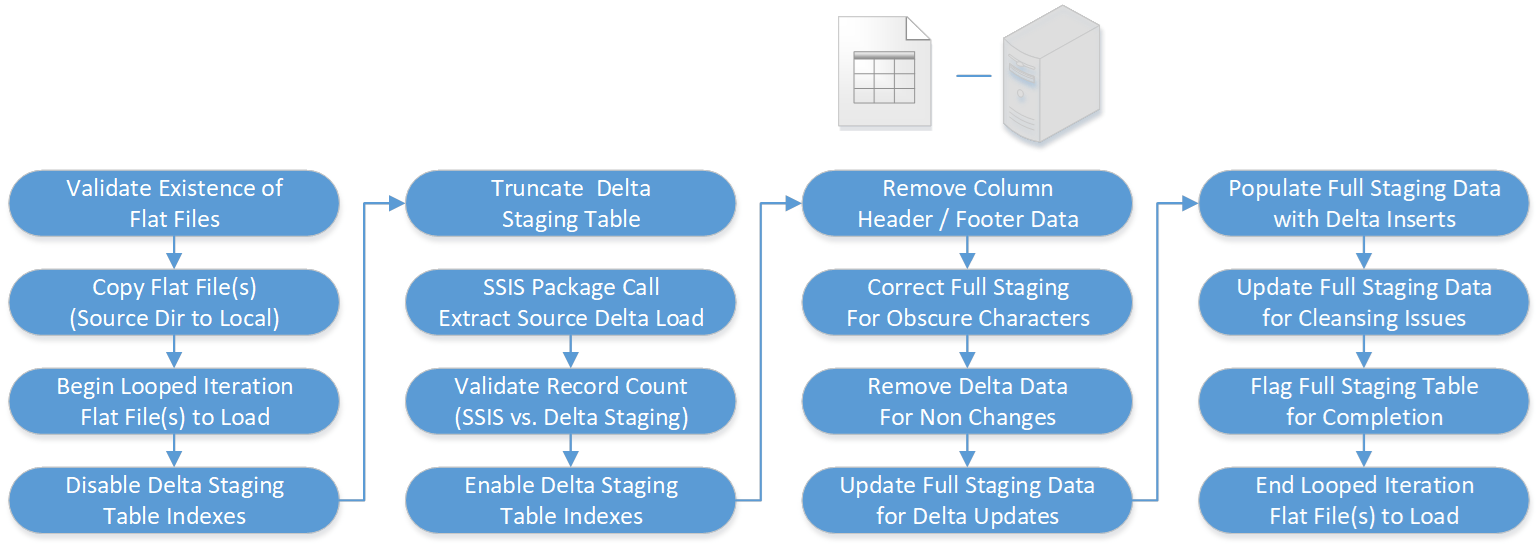
The following ETL workflow covers essential tasks needed when loading delta data flat files (csv, txt, xml or excel) from a sourced file repository to the staging area. A delta data load is required when sourced data is both a “Day 2” load or onwards and changed records in the data flat file can be correctly identified. Opting to do a delta data load will ensure history is retained, a smaller time window required and server resources reduced. When running delta data extracts, scheduled ETL job frequency is more flexible.
The extract step covers data extraction from the source flat file, in order to make it accessible for further processing from the staging area. An intrinsic part of the extraction involves data acceptance to identify for further analysis, any data that fails validation or cleansing rules. The main objective here is to retrieve only new, updated or deleted data from the sourced flat file and with as little resources as possible. EIQ2 utilises parallel loading, fast parse and set packet sizes to minimise any negatively affect in terms of performance and response time.
During the extract step, and in order to make the load process efficient, any related indexes in the delta staging area are disabled before the extract begins and then re-enabled when the extract completes. Following completion of the delta data extract and while utilising the table’s primary key, delta changes are mapped to the full staging area to determine updates, deletions and new records. A delta extract process is generally quite complex, and… as with every application, there is a possibility that the ETL process may fail. This may be caused by data corruption in the flat file, or simply a connection or power outage and so with this in mind, EIQ2 has checkpoints and fail-recovery in mind, as well as rollback.
Note: Based on sourced data flat file type, some of the following steps may not be relevant