
Availability: \\SSIS\IMPORT_EXPORT\Master_Ref_Tables.xlsx
The master EIQ2 import excel file, encompasses the underlying management of implementing master reference data tables and provides a simplified interface to change previously defined attributes. Master reference data is generally composed of static identifiers such as the names of countries, gender types etc. Such data is reasonably constant but can change.
Master reference data is frequently considered as a subset of master data. Having sourced core data to populate a master reference data set, i.e.: “Country Names” and “Country Codes”, it may well be, where related values do not exist at source, that additional or alternate information is needed, i.e.: “Regional Area” or a different spelling (“UK” to “United Kingdom”). EIQ2 manages the Master Reference Data via a circular ETL process.
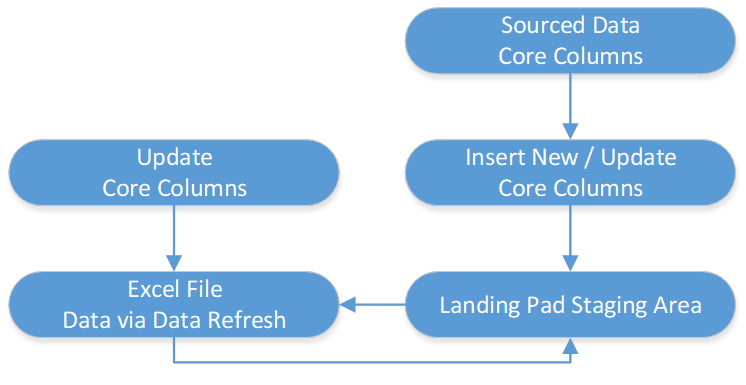
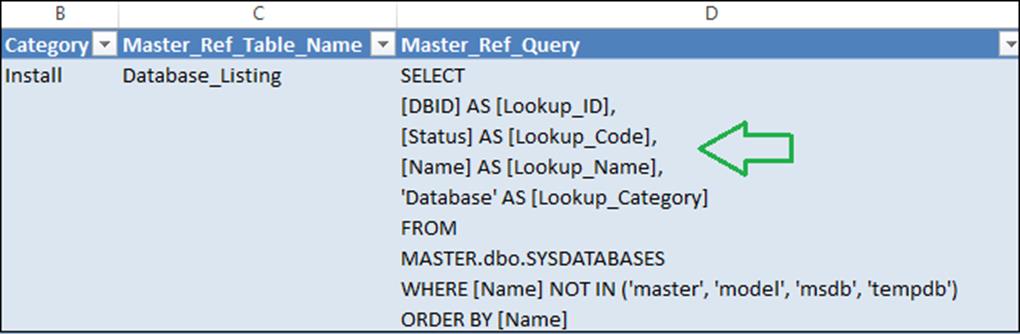
Initially, EIQ2 manages the population of the landing pad staging area through ETL, by pulling new or changed “Core” records from source. In parallel, it maps to the same area of the landing pad staging data, a file system excel file. The excel file has additional columns, where alternate information can be added. Having made changes to the excel file, a secondary ETL process picks up the excel changes and applies these to the landing pad staging area, for upstream visibility.
Edit the excel file: “\\SSIS\IMPORT_EXPORT\Master_Ref_Tables.xlsx” and following “Data > Refresh”, add the following entries:
Review your changes and save the excel file, and then run the SQL agent scheduler “ETL Sourced Import Export xlsx Data to Landing Pad”.

The SQL agent job processes the underlying “\\SSIS\IMPORT_EXPORT\Master_Ref_Tables.xlsx” excel file, then based on the “Master Ref Query” field, generates (where applicable), related file system and database related objects:
Once previous step has completed, run the newly generated SQL agent scheduler “ETL Sourced Master Data xlsx Data to Landing Pad”.

Finally and once the SQL agent scheduler: “ETL Sourced Master Data xlsx Data to Landing Pad”. Has completed, open the recently created “SSIS\Master_Data\xxxx\xxxx.xlsx” excel file and prior to refreshing and editing the data, repoint the excel file to its corresponding configuration file: (\SSIS\Master_Data\Connectivity\xxxx.odc).
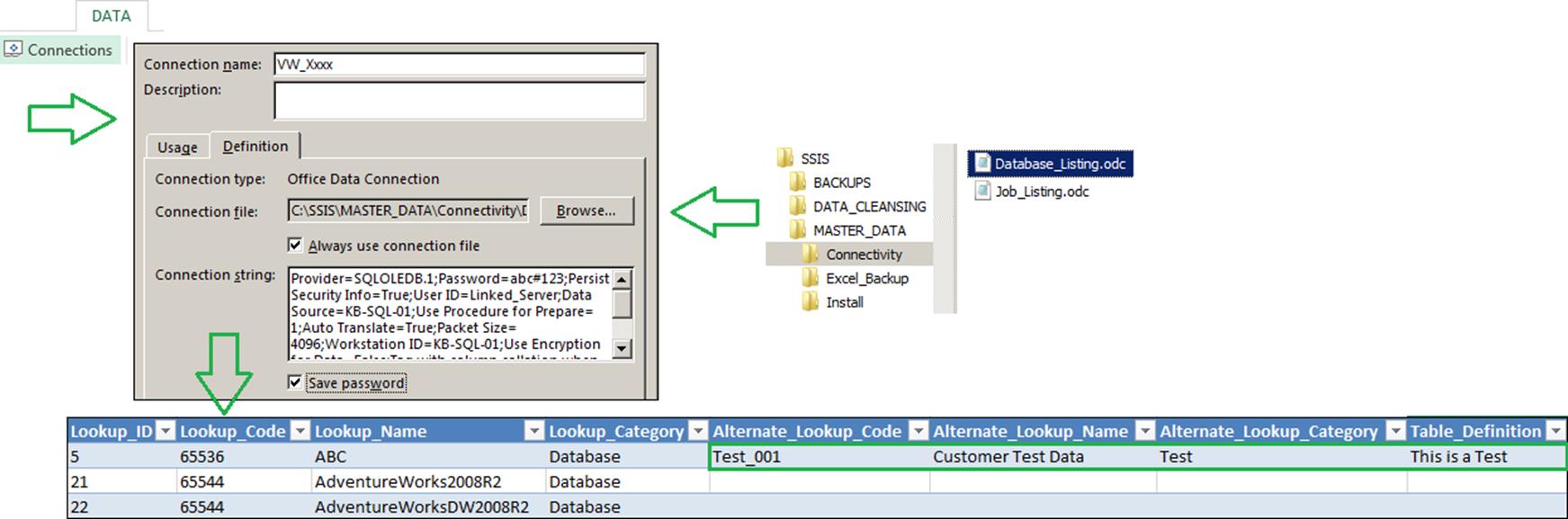
Data values edited against the alternate columns in the excel file, will be reflected against the staging landing pad database, when ETL for the “Master Data” process is next run.
Column Metadata
|
Row |
Column Name |
Description |
Dropdown |
Sample Input |
|
1 |
Job ID |
A unique ID associated to a single EIQ2 process (Object). This Column is for Info Only. Do Not Edit |
n/a |
n/a |
|
2 |
Category |
Enter Category for Master Reference Data, i.e.: Finance, Sales, and Other etc. This generates a folder against \SSIS\Master_Data\… – where-in “File Share” security can be applied |
No |
Free Text |
|
3 |
Master Ref Table Name |
Enter name for newly created master reference data, i.e.: Gender, Region, Status etc. |
No |
Free Text |
|
4 |
Master Ref Query |
Enter valid SQL query, to populate master ref data. (All 4 columns required), i.e.: SELECT ID AS [Lookup_ID], Code AS [Lookup_Code], Desc_Name AS [Lookup_Name], ‘Gender’ AS [Lookup_Category] FROM Raw_Full_xx_Landing_Pad.xx.VW_Gender |
No |
Free Text |
|
5 |
Remove Table |
True: Remove all Database related objects from the ETL process. False to remain |
Yes |
True / False |