EIQ2 provides an array of ease-of-use reports (Status, Trends, Process Flows, Graphs and KPIs, Drill-Downs etc.), via SQL server reporting services and in an easily consumable format, to support the administration and maintenance of the EIQ2 environment. Some of these reports concentrate on ETL process flows, such as timings, record counts and data changes. Other reports focus on historical comparisons, data cleansing and auditing and error management. The underlying reports reside in “\SSIS\SSRS\Reports\SSRS_REPORTS”
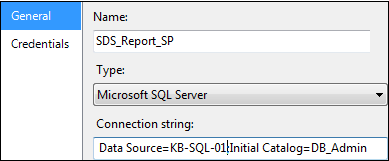
Note: Throughout this document, the following default server reference: “KB-SQL-01”, needs to change to reflect the correct name for the destination EIQ2 SQL server environment.
SELECT Convert(Varchar(200), ISNULL(SERVERPROPERTY(‘SERVERNAME’), HOST_NAME()))