
Availability: \\SSIS\IMPORT_EXPORT\Landing_Pad_Search_Columns.xlsx
The master EIQ2 import excel file, encompasses the underlying management for searchable data columns and provides a simplified interface to change previously defined attributes.
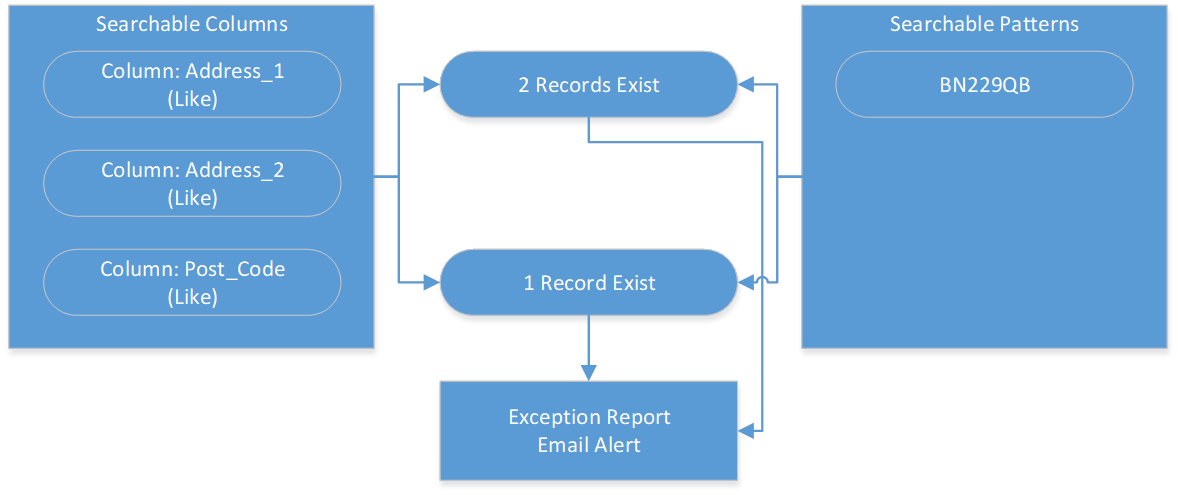
Searchable columns are data columns in the landing pad staging area, which can hold specific data values or data pattern types, i.e.: Jon Smith, [0-9], [0-9], [0-9] etc. Data search patterns, roughly equivalent to text analytics, focus on the recognition of patterns and regularities in the data.
This file is linked to the master EIQ2 import excel file: “\\SSIS\IMPORT_EXPORT\Landing_Pad_Search_Patterns.xlsx”
Note: Searchable table columns, excluded from this excel file, include those associated to primary keys, and those, where-in data types fall into the following types:
Column Metadata
|
Row |
Column Name |
Description |
Dropdown |
Sample Input |
|
1 |
Database Name |
A unique name for the sourced database. This Column is for Info Only. Do Not Edit |
n/a |
n/a |
|
2 |
Data Source Name |
This field relates to the name of the sourced data source, from whence the data is associated. This Column is for Info Only. Do Not Edit |
n/a |
n/a |
|
3 |
Data Source ID |
The Data Source ID is unique and maps to the underlying name of the data source. This Column is for Info Only. Do Not Edit |
n/a |
n/a |
|
4 |
Job ID |
A unique ID associated to a single EIQ2 process (Object). This Column is for Info Only. Do Not Edit |
n/a |
n/a |
|
5 |
Table Name |
A unique name for the table being referenced. This Column is for Info Only. Do Not Edit |
n/a |
n/a |
|
6 |
Column Name |
A unique name for the column being referenced. This Column is for Info Only. Do Not Edit |
n/a |
n/a |
|
7 |
Data Type |
This field shows the current data type associated to the column name. This Column is for Info Only. Do Not Edit |
n/a |
n/a |
|
8 |
Search Action |
Identify related records – where-in the column has matched data patterns, i.e.: Equal to, Like or Not Like. Default value: “NA” |
Yes |
Equal / Like / Not Like etc. |
|
9 |
Search Status |
Enable: To enable Data Search against this table column. Default value: “NA” |
Yes |
Enable / Remove |
|
10 |
Consent Type |
Identify what form of consent or data format, is flagged against these matched data patterns. Default value: “NA” |
Yes |
Email / Security etc. |